We published a new patch version of React Live Chat Loader (2.8.1). In this release, we realigned react-live-chat-loader placeholder styling with Intercom’s current default styling (#215) and bumped all outdated dependencies.
Open source: React Live Chat Loader 2.8.1

Fix: Resend organisation invitation email delivery

We fixed a problem preventing organisation invitation emails from being delivered in the case where the Resend invitation button was pressed multiple times by the same person to send another invitation email.
Updated Time to First Byte recommendation
Previously Calibre recommended that Time to First Byte (TTFB) should be below 150ms for a good user experience. The recommendation has now been updated to < 300ms based on global data from the Chrome User Experience Report (CrUX).
In Calibre, you will now see a warning if your TTFB is above 300ms and a critical error if it is above 800ms.
Open source: React Live Chat Loader 2.8.0
We published a new, minor version of React Live Chat Loader (2.8.0). In this release we:
- Add
containerClassprop to allow custom CSS classes on the chat container element - Improve Typescript definitions
- Refresh the documentation and demo website
- Update placeholder styles to reflect the current default styling of all supported chat beacons
These changes will make using and contributing to React Live Chat Loader easier.
Improved contrast for badge elements

We improved the badge element contrast to pass Web Content Accessibility Guidelines (WCAG) AAA (enhanced contrast) accessibility audits. Previously, they only met the standard on AA (minimum contrast) requirement.
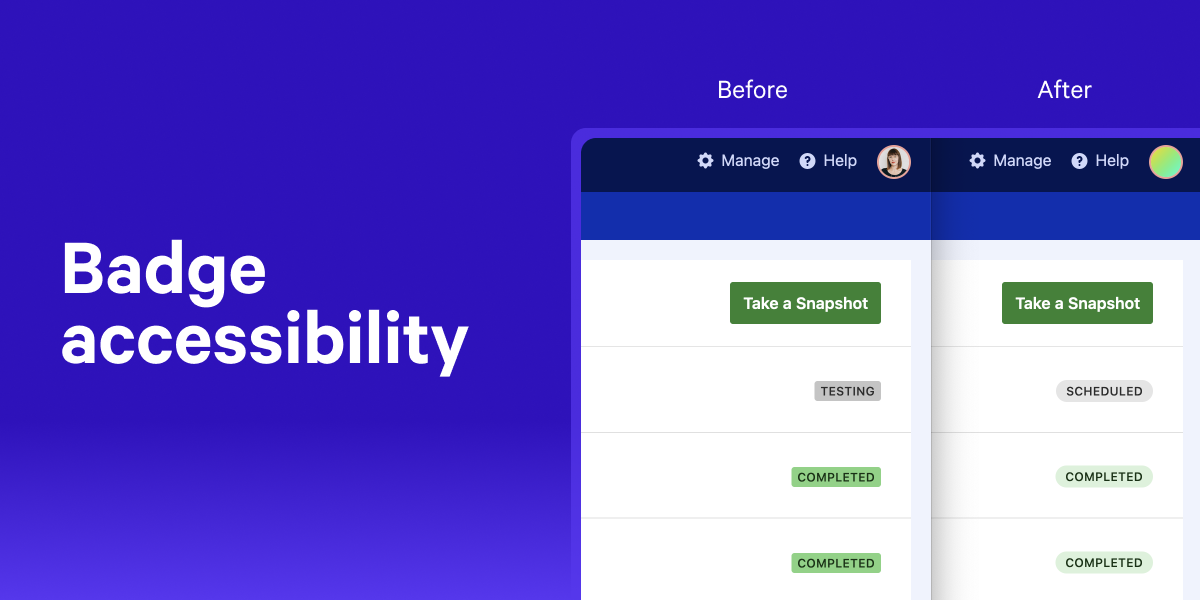
On top of that, we also slightly amended the appearance of badges to give a more soft, rounded feeling. You can see them in action on the Snapshots list, Snapshot page, and Budgets.
We’ll continue evaluating and improving contrast and other accessibility features across Calibre.
Open source: React Live Chat Loader supports React 18
React Live Chat Loader now supports React 18, thanks to contribution from Chris Schuld.
Chrome 104 and Lighthouse 9.6.4
Our Test Agents are now using Chrome 104 and Lighthouse 9.6.4 to test your Sites.
CLI 5.0.2
We published a patch CLI release with the following changes:
- Updated
calibre device-listcommand to output additional emulated device details (screen width and height, device type: phone tablet or desktop and status: current or discontinued)
Open source: easier issue reporting
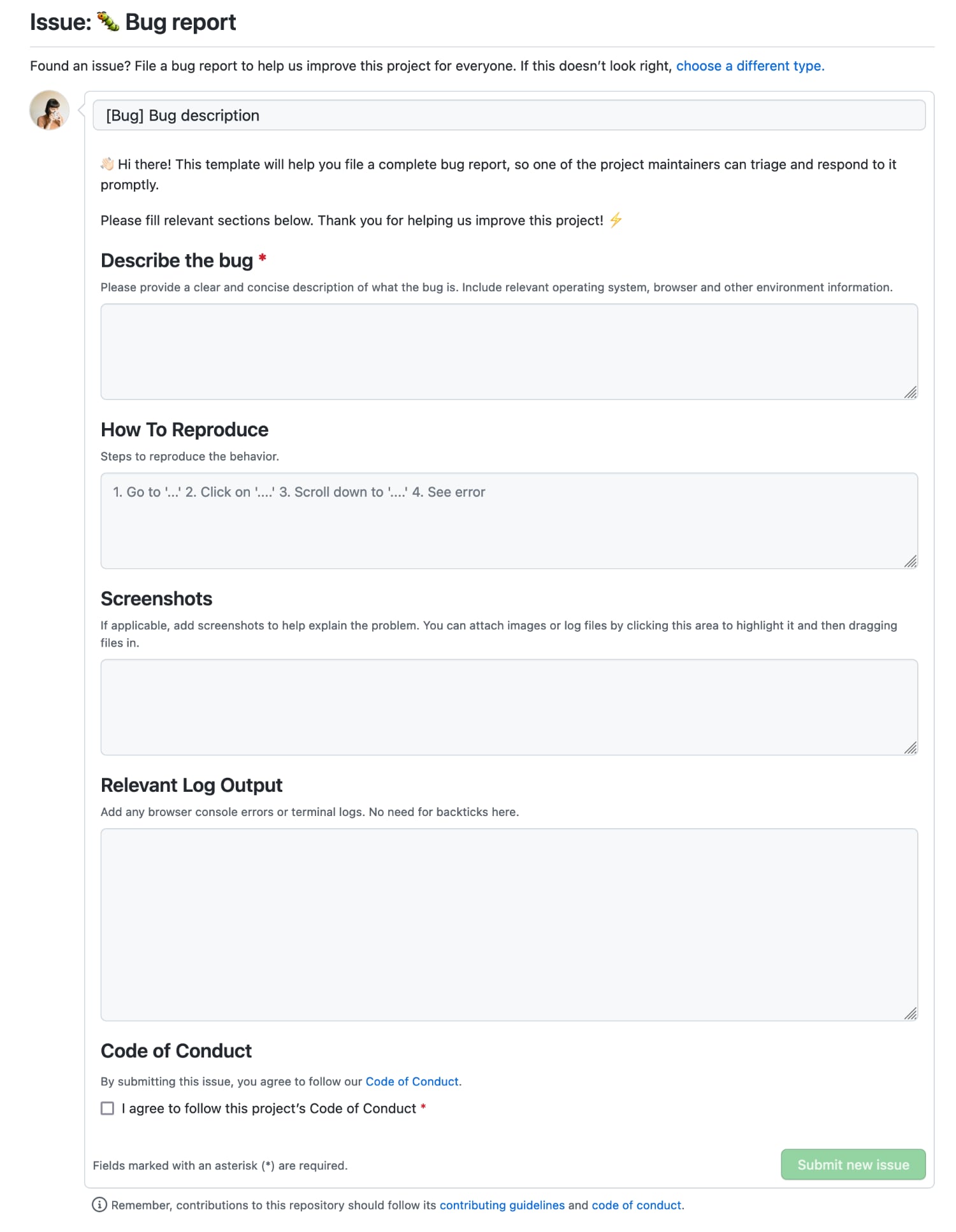
We continue to improve our open source projects’ governance. React Live Chat Loader, Image Actions and the Calibre Command Line Interface, and Node.js API are now using GitHub Issue Forms. While Issue Forms are currently in beta, they offer a more pleasant and guided way to submitting bugs and questions. See them in action below:
Snapshots: See Chrome and Lighthouse versions for each test
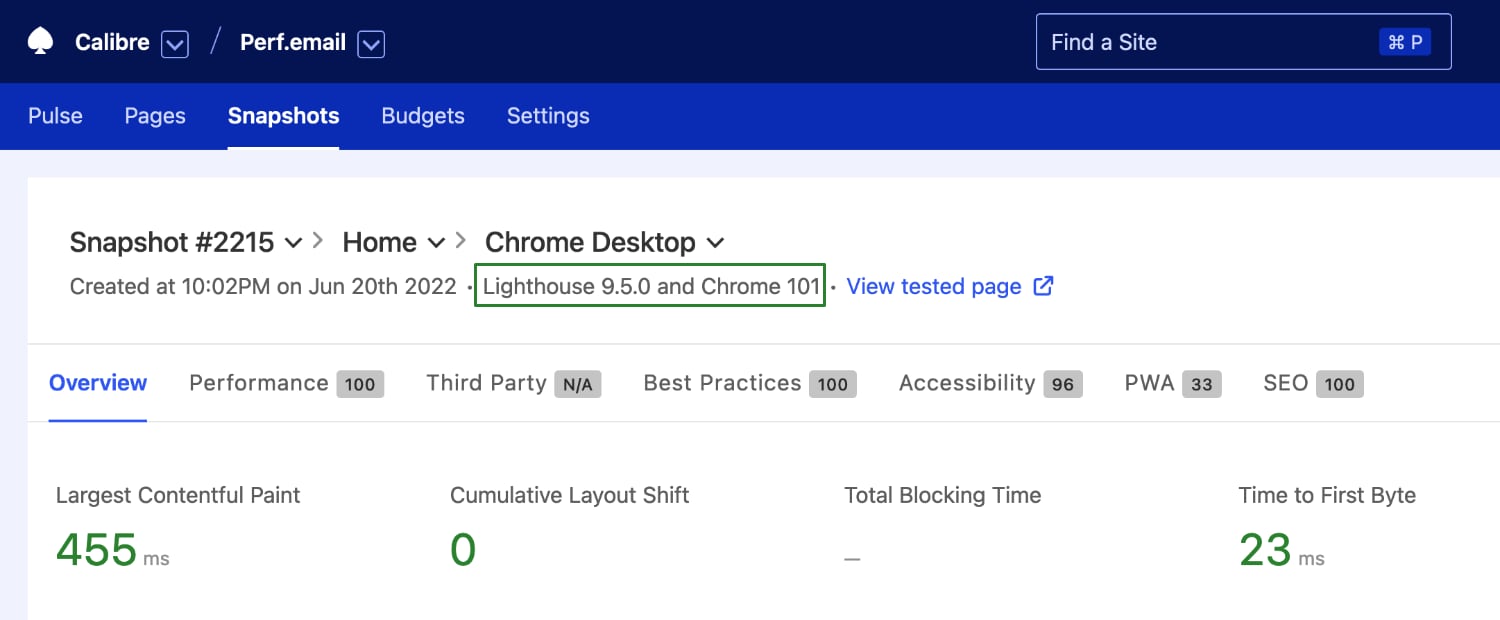
In synthetic and real user monitoring, it’s critical to understand the conditions in which people browse your sites so that we can correlate it to performance. It’s also not uncommon for metric definitions and collection methods to change or bugs to emerge.
To improve the transparency of test settings and debugging changes, we added the Chrome and Lighthouse versions for each test to the Snapshot and Single Page Test report pages:
CLI 5.0.1
In 5.0.1, we added a new command, calibre team list, that lists all Teams your API Access Token can access. We also rewrote all command descriptions for better clarity.
New metrics in Core Web Vitals Test
You can now see your real user data for Time to First Byte (TTFB) and Interaction to Next Paint (INP) using Core Web Vitals Test:
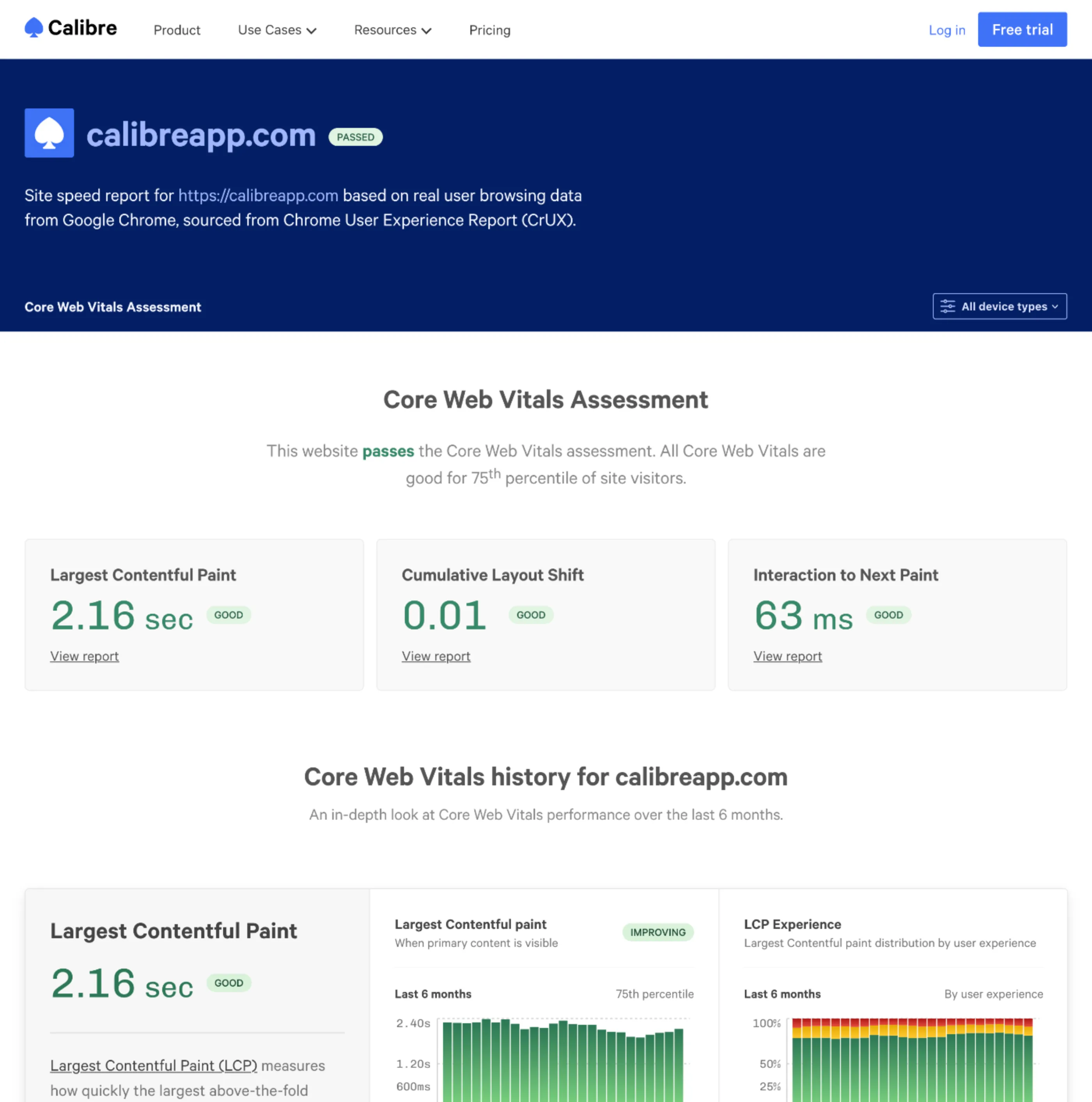
Core Web Vitals report for calibreapp.com domain.
Time to First Byte is critical to track as it can have a cascading, adverse effect on page load and speed. Interaction to Next Paint is a new, experimental metric measuring the longest observed delay between user interaction and the response on your page. While these metrics are not included in the Core Web Vitals set now, we’d recommend adding them to your “to track” list.
Open source: better usage and contribution guides
We believe transparent governance is critical to any open source project. We updated our most popular projects (React Live Chat Loader, Image Actions and the Calibre Command Line Interface and Node.js API) to reflect the same policies, such as Code of Conduct, security, contribution and issue logging guidelines.
We also updated project READMEs accordingly to make usage and collaboration even more accessible.
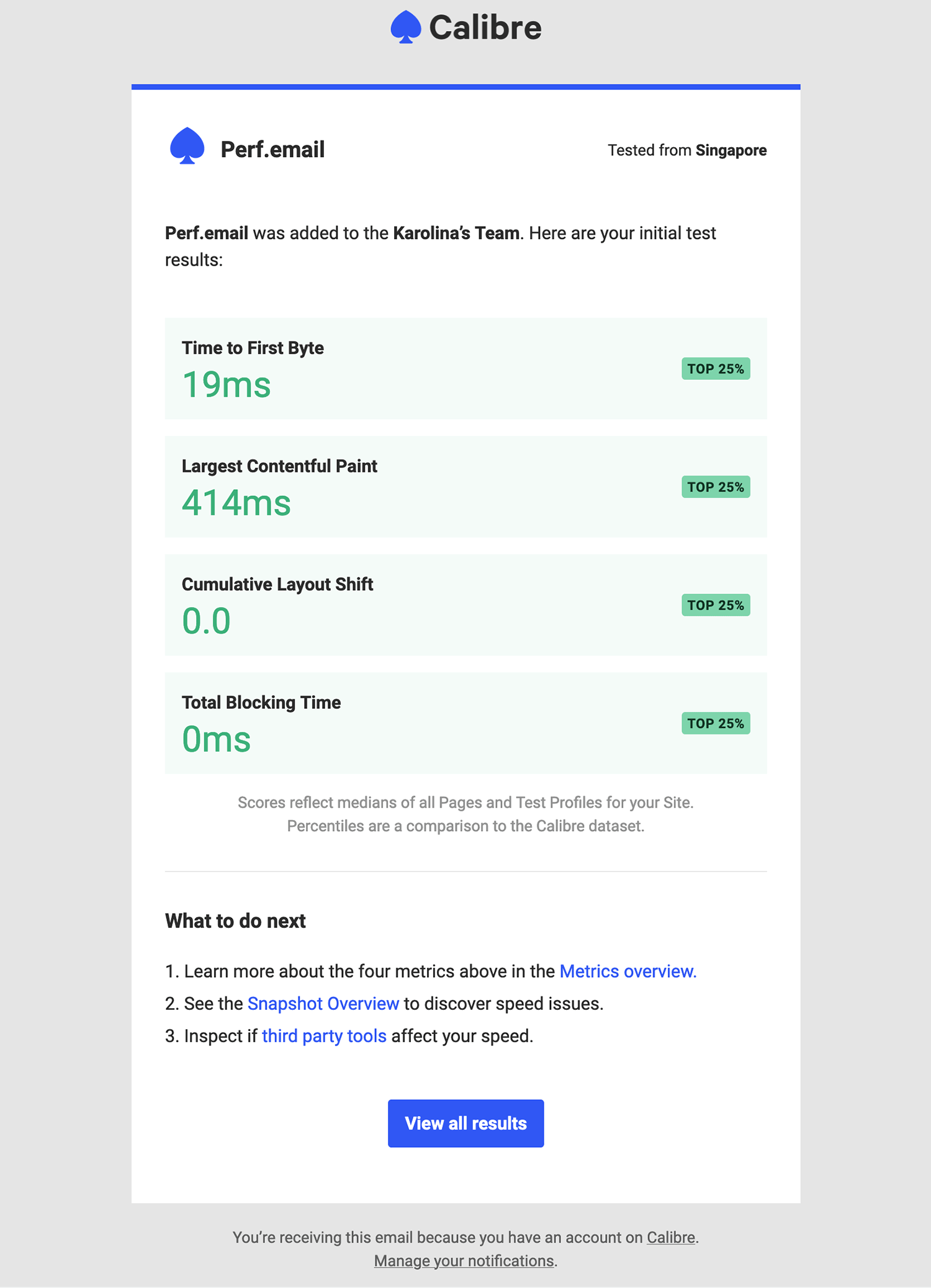
Insights Report: See how your Sites rank based on Time to First Byte
When you add a new Site to monitor in Calibre, we send a summary email with crucial page speed metrics and how you rank against our measurements dataset. To provide a more comprehensive picture of web performance, alongside Web Vitals, we added Time to First Byte to the email report:
CLI 5.0.0
We published a new, major version of Calibre’s CLI (5.0.0), now written in ES Modules! With this release we:
- Add a new flag for
calibre test create:--waitForTest - Add new package exports:
cli-commandsandcli-metadata(to return command functions and documentation) - Add
CLI_COMMANDS.mdthat lists all available commands with their options for easy reference - End support for Node 12
From the 5.0.0 version, we’re also ceasing to update the standalone binary builds for the CLI. They will remain accessible for now, but the recommended method of installing an up-to-date version of the CLI is npm.
Pull Request Reviews: Set cookies and headers
Setting Cookies and Headers to either authenticate to your Sites or control the test environment has been in Calibre for some time (set via either the Test Agent or Test Profiles). Now, you can specify those settings while using Pull Request Reviews too:
version: 2
pullRequestReviews:
  # Headers
  - headers:
      - name: X-Calibre-Test
        value: Pull Request
      - name: User-Agent
        value: Calibre

  # Cookies
  - cookies:
      - name: seen-cookie-notice
        value: true
      - name: uid
        value: 1
        domain: calibreapp.com
        path: /
        secure: true
        httpOnly: true
This is especially useful if you’d like to set cookies and headers only for Pull Request Reviews tests (not inherited from Test Profiles settings). For example, you could set a header to signify that the test is for a Pull Request and should be safely routed to the staging infrastructure.
Chrome 99 and Lighthouse 9.5
Our Test Agents are now using Lighthouse 9.5 and Chrome 99 to test your Sites.
Lighthouse 9.3.1 and Chrome 97
Our Test Agents are now using Lighthouse 9.3.1 and Chrome 97 to test your Sites.
Authentication: Apply cookies and headers during authentication
If you’re using cookies and headers (either in Test Profiles or Site Settings → Test Agent area), we now change when they are applied.
Previously, Calibre set cookies and headers post-authentication. Now, they are applied during authentication so that you can control more fine-grained authentication scenarios, such as hiding CAPTCHA, so Calibre can quickly test your Site or application.
Billing: Pay in Euro and Australian Dollars
We introduced two new currencies (EUR and AUD) and several new payment methods, so your team can choose a way of paying that’s most convenient and least costly. You can change your payment currency at any time:
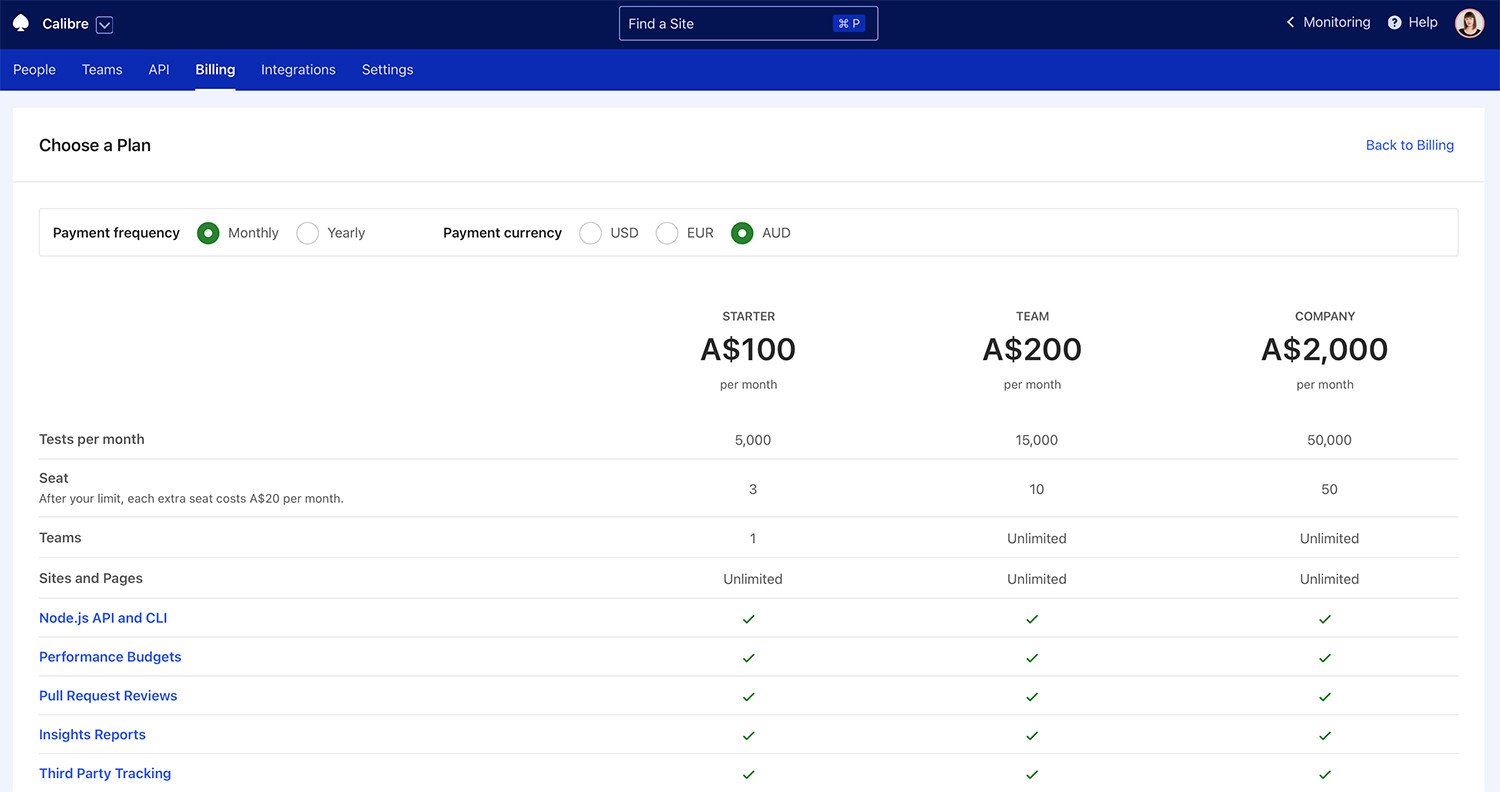
Because limited payment methods can be a software adoption blocker and a source of accounting issues, we also added several new methods of purchasing a subscription—not all of which rely on credit cards. We now accept:
- Credit Card (all plans)
- Apple Pay (all plans, only in Safari browser)
- Google Pay (all plans, only in Google Chrome browser)
- Single Euro Payments Area (SEPA) Direct Debit (all plans in EUR currency)
- Bulk Electronic Clearing System (BECS) Direct Debit (all plans in AUD currency)
Thanks to SEPA and BECS, customers in Australia and SEPA countries with relevant plans (AUD or EUR) can pay for their subscription directly from a nominated bank account. You can change your payment method in Billing → Payment Method tab.
With the new payment methods and currencies, we switched to invoices generated by our payment provider—Stripe. Your designated Billing email will still receive invoices after each transaction, and each Administrator can access the entire invoice history in Invoice History and Settings.
Snapshots: Get more insights about Lighthouse failures
We made it possible to display the request table (from the corresponding HAR file) even when your tests fail. We’re now surfacing more information about errors that lead to Lighthouse failures directly in the Snapshot view, so it’s easier to find out the exact reason:
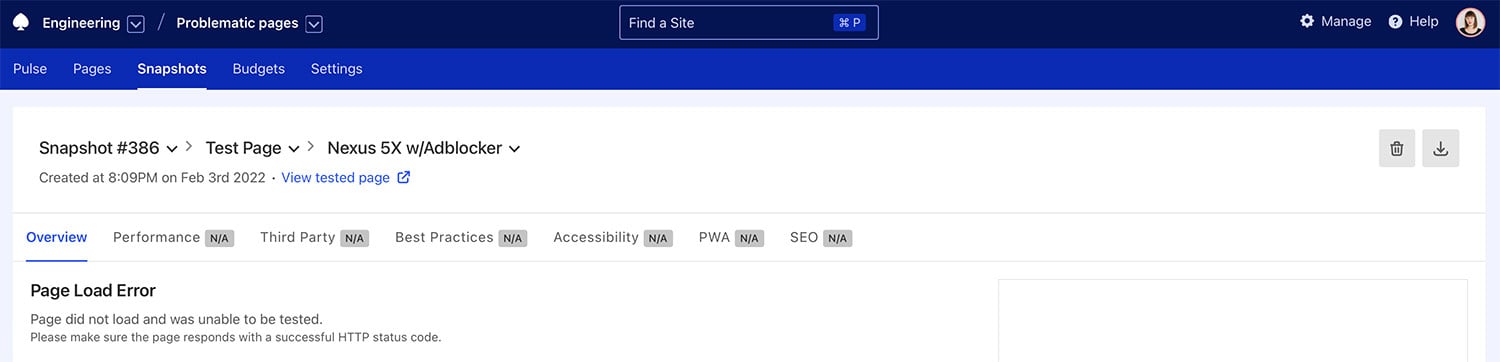
If your tests are failing (continually or intermittently), you can also refer to the Why do my tests fail? guide that walks through common scenarios and steps to fix them.
CLI 4.1.0 and 4.2.0
With two minor releases of Calibre CLI, we added new commands and ways to query your data. Site.get and Site.update now allow obtaining and updating given Sites. We added missing fields to Test Profiles, Deploys, Location, Metric budgets, and Page queries so that you can receive and manipulate all test data.
Security: Confirm your email account
We continually build on our best practices to protect your account and data. From now on, all new registrations and, periodically, existing users will have to verify their email accounts unless they are using Google as a method of authentication.